Custom Cursor for Squarespace
A custom cursor is a small detail that makes a portfolio or studio site feel designed down to the pixel. This snippet replaces the default cursor with a solid dot and a trailing ring that eases after it, growing when it passes over links and buttons. It checks for coarse pointers first, so phones and tablets keep their normal touch behavior, and the native cursor is only hidden when the custom one is actually running. Two color values recolor the whole thing for your brand.
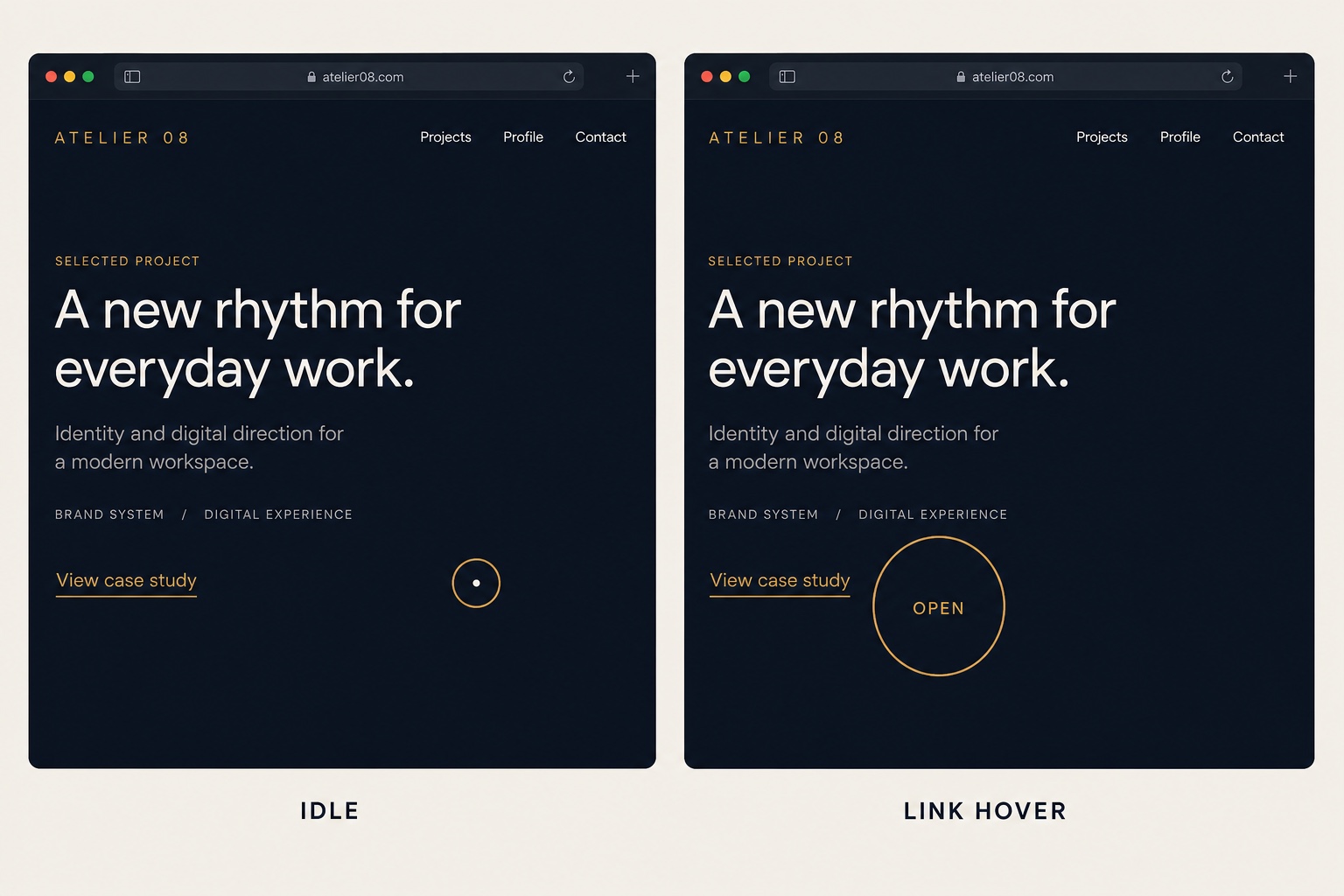
The Code
<script>
(function () {
  /* Skip touch devices entirely: they have no cursor to replace */
  if (window.matchMedia('(pointer: coarse)').matches) return;

  var dot = document.createElement('div');
  var ring = document.createElement('div');
  dot.className = 'cursor-dot';
  ring.className = 'cursor-ring';
  document.body.appendChild(dot);
  document.body.appendChild(ring);
  document.body.classList.add('has-custom-cursor');

  var mouseX = -100, mouseY = -100; /* start off-screen */
  var ringX = -100, ringY = -100;

  document.addEventListener('mousemove', function (e) {
    mouseX = e.clientX;
    mouseY = e.clientY;
    dot.style.transform = 'translate(' + mouseX + 'px, ' + mouseY + 'px)';
  });

  /* The ring trails the dot with a little easing */
  function follow() {
    ringX += (mouseX - ringX) * 0.15;
    ringY += (mouseY - ringY) * 0.15;
    ring.style.transform = 'translate(' + ringX + 'px, ' + ringY + 'px)';
    requestAnimationFrame(follow);
  }
  follow();

  /* Grow the ring over links and buttons */
  document.addEventListener('mouseover', function (e) {
    if (e.target.closest('a, button')) ring.classList.add('is-active');
  });
  document.addEventListener('mouseout', function (e) {
    if (e.target.closest('a, button')) ring.classList.remove('is-active');
  });
})();
</script>/* Hide the native cursor only while the custom one is running */
body.has-custom-cursor,
body.has-custom-cursor a,
body.has-custom-cursor button {
cursor: none;
}
.cursor-dot,
.cursor-ring {
position: fixed;
top: 0;
left: 0;
pointer-events: none; /* never block clicks */
border-radius: 50%;
z-index: 9999;
}
.cursor-dot {
width: 6px;
height: 6px;
margin: -3px 0 0 -3px;
background: #c9974a; /* dot color */
}
.cursor-ring {
width: 34px;
height: 34px;
margin: -17px 0 0 -17px;
border: 1.5px solid rgba(201, 151, 74, 0.6); /* ring color */
transition: width 0.2s ease, height 0.2s ease, margin 0.2s ease;
}
/* Larger ring over links and buttons */
.cursor-ring.is-active {
width: 52px;
height: 52px;
margin: -26px 0 0 -26px;
}How to Install It
- 1Go to Settings > Advanced > Code Injection (Website Tools > Code Injection on newer dashboards) and paste the JavaScript into the Footer field.
- 2Paste the CSS into Design > Custom CSS.
- 3Change the two color values (dot background and ring border) to your brand accent.
- 4Test on a desktop browser; touch devices are skipped automatically.
Compatibility and Plan Requirements
Squarespace 7.1 and 7.0. Automatically disabled on touch devices via a coarse pointer check. Requires the Business plan or higher for code injection.
This snippet uses JavaScript, which Squarespace only runs through code injection or code blocks on the Business plan or higher. On Personal plans the script will not execute.
More Squarespace Snippets
View all
Want This Done For You?
If you would rather not touch code, or you need something bigger than a snippet, I build custom Squarespace features for clients every week: widgets, search and filter tools, integrations, and full sites.