Image Hover Zoom for Squarespace
A slow zoom on hover adds life to portfolios and product imagery without being flashy. This snippet applies a smooth scale effect to Squarespace 7.1 image blocks and to grid and masonry gallery items, keeping each image cropped inside its frame with overflow hidden so nothing spills into the layout. The timing uses a relaxed 0.45 second ease so the zoom feels editorial rather than jumpy. It is pure CSS, works on any plan, and is easy to retune by changing one scale value.
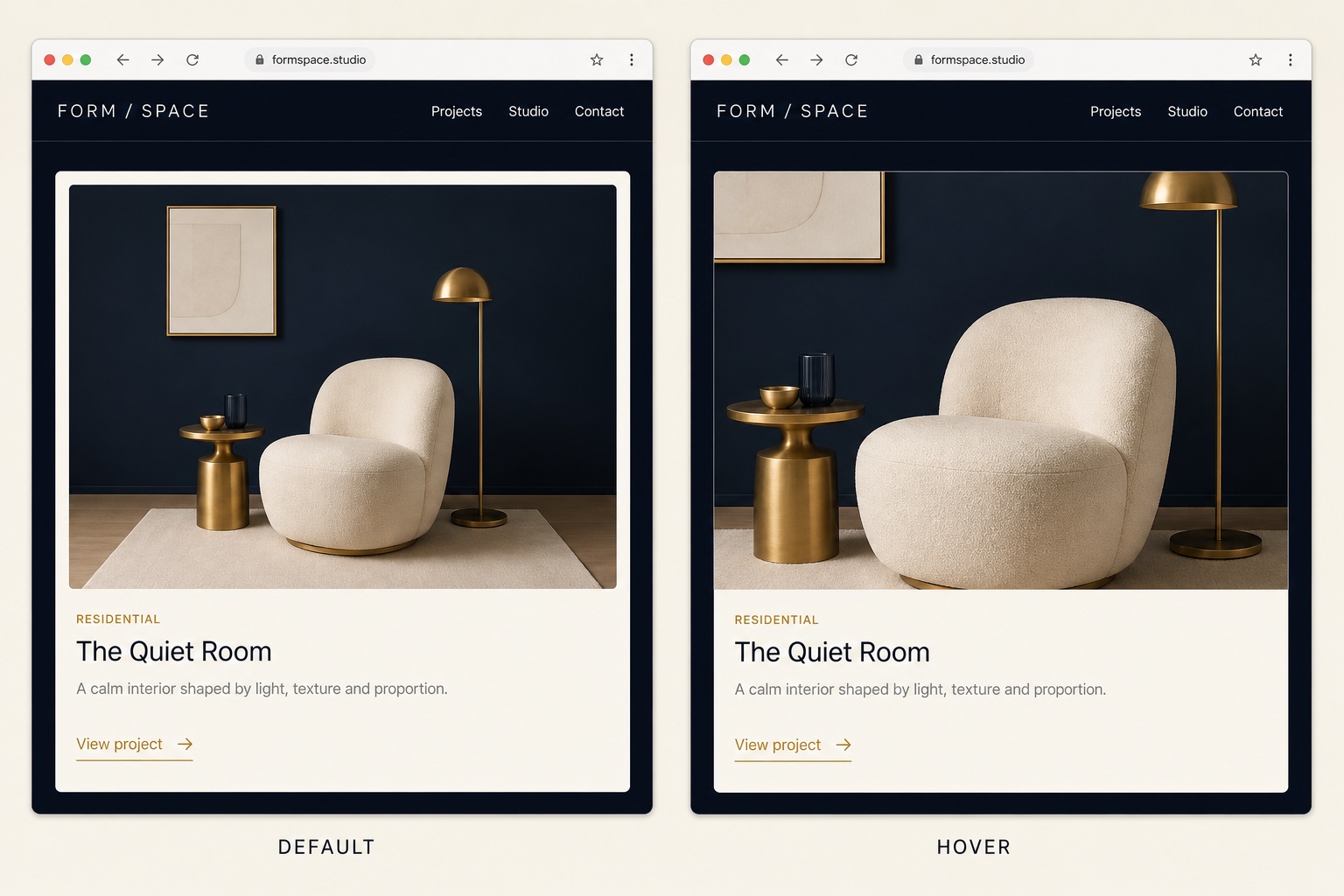
The Code
/* Image blocks: keep the zoomed image cropped inside its frame */
.sqs-block-image .image-block-wrapper {
  overflow: hidden;
}

.sqs-block-image img {
  transition: transform 0.45s ease;
}

.sqs-block-image:hover img {
  transform: scale(1.06);
}

/* Gallery sections: grid and masonry layouts.
   Other gallery types use different classes, inspect and extend. */
.gallery-grid-item,
.gallery-masonry-item {
  overflow: hidden;
}

.gallery-grid-item img,
.gallery-masonry-item img {
  transition: transform 0.45s ease;
}

.gallery-grid-item:hover img,
.gallery-masonry-item:hover img {
  transform: scale(1.06);
}
How to Install It
- 1Go to Design > Custom CSS (Website Tools > Custom CSS on newer dashboards).
- 2Paste the snippet and save.
- 3Hover any image block or gallery image to test. Adjust the scale value (1.06) for a stronger or weaker zoom.
Compatibility and Plan Requirements
Squarespace 7.1 (Fluid Engine and classic sections). Gallery class names vary by gallery type; grid and masonry are covered here, inspect other layouts and extend the selectors.
This snippet is pure CSS, so it works on any Squarespace plan, including Personal, through the Custom CSS panel. No Business plan needed.
More Squarespace Snippets
View all


Want This Done For You?
If you would rather not touch code, or you need something bigger than a snippet, I build custom Squarespace features for clients every week: widgets, search and filter tools, integrations, and full sites.